Finder’s audiobook sync list on my Mac had become disconnected from reality.
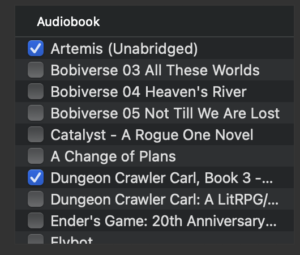
Deleted audiobooks were still listed. Newly added audiobooks were missing. Apple Books showed the correct library, but connecting my iPhone and opening Finder → iPhone → Audiobooks displayed a much older catalogue.
After investigating with ChatGPT and Codex, we found a separate Books database maintained by AMPLibraryAgent. Its contents matched Finder’s stale list. Backing up that catalogue and moving it aside allowed the list to rebuild correctly.
Here’s how we found it, what fixed my case, and how to test the same fix without deleting your original files.
The symptoms
My Apple Books library contained eight audiobooks. Finder showed only three of those eight, alongside numerous older books I had deleted.
Examples of the ghost entries included:
- The Martian
- The original Dungeon Crawler Carl
- Several Harry Potter books
- Older Bobiverse titles
Meanwhile, these five books were present in Apple Books but missing from Finder:
- The Gate of the Feral Gods
- The Butcher’s Masquerade
- The Eye of the Bedlam Bride
- This Inevitable Ruin
- A Parade of Horribles
Safe Mode temporarily made Finder’s audiobook list correct. Returning to normal operation brought the problem back.
Resetting Books caches and Finder sync settings hadn’t fixed it.
There was a second Books catalogue
The most useful discovery was this file:
~/Library/Application Support/com.apple.AMPLibraryAgent/Libraries/Books/Books Library.bookslibrary/Books.bkdbThe ~ means your home folder.
This file is separate from the database used by the Books app itself. In my case, Books’ own library was correct while this AMPLibraryAgent catalogue retained older audiobook records.
That distinction explained why repeatedly investigating or resetting Books’ own caches wasn’t getting us anywhere.
It also explained why our earlier file search missed the target. We had searched for filenames containing terms such as itunes, amp, device, sync, and media. Although that found AMPLibraryAgent’s parent directory, it didn’t list the neutrally named Books.bkdb buried inside it.
The lesson: finding a suspicious directory is a reason to inspect its complete contents, not just filenames matching the original search terms.
How we confirmed the connection
With the stale Finder list visible, this command showed which process had the file open:
lsof -nP "$HOME/Library/Application Support/com.apple.AMPLibraryAgent/Libraries/Books/Books Library.bookslibrary/Books.bkdb"The output identified AMPLibraryAgent. The process name appeared abbreviated as AMPLibrar in the command’s output.
That was a useful lead, but it wasn’t sufficient proof. A process holding a database open doesn’t tell you what records are inside or whether Finder uses them.
We also tried tracing file activity while switching Finder from General to Audiobooks. Nothing matching the relevant database paths was recorded. That was inconclusive: the agent could already have loaded the catalogue into memory.
The decisive evidence came from inspecting the database contents.
Why a normal text search didn’t find the books
Books.bkdb wasn’t an ordinary SQLite database or readable property list. Its header began with hfma, and its contents were encrypted and compressed.
Codex successfully decoded a local inspection copy using a method compatible with the related Apple Music database format. The original file was left untouched, and its checksum remained unchanged.
The decoded catalogue contained 52 track records grouped under 24 book/album names. Some audiobooks had multiple chapter or part records, so the track count was higher than the number of books.
Those 24 book/album names matched the entries visible across my Finder screenshots.
The deleted books weren’t just vague text fragments. For example, the catalogue contained:
- The Martian, with Andy Weir in the author field and RC Bray in the narrator-related field.
- Dungeon Crawler Carl: A LitRPG/Gamelit Adventure, with Matt Dinniman and Jeff Hays.
- Filename references to
Andy Weir - The Martian.m4bandBook 1 - Dungeon Crawler Carl_fixed.m4b.
The five current books missing from Finder were also absent from the decoded catalogue.
Here was the complete comparison:
| Current audiobook in Books | Finder before the fix | AMPLibraryAgent catalogue |
|---|---|---|
| Artemis | Present | Present |
| Roadkill | Present | Present |
| The Dungeon Anarchist’s Cookbook | Present | Present |
| The Gate of the Feral Gods | Missing | Absent |
| The Butcher’s Masquerade | Missing | Absent |
| The Eye of the Bedlam Bride | Missing | Absent |
| This Inevitable Ruin | Missing | Absent |
| A Parade of Horribles | Missing | Absent |
That was strong evidence that we had found the stale catalogue behind Finder’s list.
Other databases we investigated
AMPDevicesAgent also had Cache.db, HTTP storage files, and the Music library’s Extras.itdb and Genius.itdb open.
Those initially looked promising. However, inspecting the agents’ Cache.db schemas showed HTTP-response-cache tables. Their listed requests concerned Apple configuration and registration rather than an audiobook index.
They became much weaker suspects once we found the separate Books catalogue.
We did not delete those caches, reset the Music library, or modify Books’ correct library database as part of the successful test.
The fix: back up, quarantine, and rebuild
This fixed Finder’s list in my case. I cannot promise that every audiobook sync problem has the same cause.
The procedure preserves the original catalogue and includes a way to restore it. It does not require decoding or editing the database.
Do not make changes while an audiobook sync is running.
1. Disconnect the iPhone and close the apps
Eject and disconnect the iPhone.
Quit Apple Books and Music.
Open Activity Monitor, find AMPLibraryAgent, select it, and choose Stop → Quit. I used ordinary Quit.
2. Back up the complete AMPLibraryAgent Books folder
Run the following in Terminal.
Keep that same Terminal window open throughout the procedure: the later commands reuse these variables.
amp_books_root="$HOME/Library/Application Support/com.apple.AMPLibraryAgent/Libraries/Books"

amp_books_current="$amp_books_root/Books Library.bookslibrary"

amp_books_backup="$HOME/Desktop/AMP-Books-backup-$(date +%Y%m%d-%H%M%S)"

mkdir "$amp_books_backup"

ditto "$amp_books_root" "$amp_books_backup/Books"

diff -rq "$amp_books_root" "$amp_books_backup/Books"
This creates a dated backup on the Desktop. It includes the current catalogue and any historical library packages in that Books folder.
The final diff command should produce no output, indicating that it found no content differences.
If any command reports an error, or diff reports differences, stop before moving the original.
3. Check that the current catalogue is no longer open
Run:
lsof -nP +D "$amp_books_current"There should be no process rows holding files inside the package open.
If AMPLibraryAgent still appears, stop. It may have restarted or may not have quit successfully.
Warnings about inaccessible volumes can make lsof output incomplete; don’t treat a warning as proof that the catalogue is closed.
4. Move the current catalogue into quarantine
Once the backup has been verified and the package is closed:
mv -n "$amp_books_current" \
  "$amp_books_backup/quarantined-original.bookslibrary"
This moves the original package into the backup folder on the Desktop.
It does not delete the package. It also does not move or delete the actual audiobook files managed by Apple Books.
Keeping the original outside AMPLibraryAgent’s library folder makes the test reversible.
5. Reopen Books and inspect Finder
Open Apple Books and confirm that your actual audiobook library still appears correctly.
In my case, all eight books were still there.
Reconnect the iPhone and open:
Finder → iPhone → Audiobooks
Inspect the list before clicking Apply or Sync.
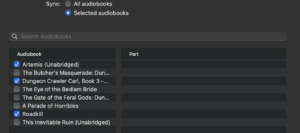
For me, this was the moment everything changed: Finder showed all eight current audiobooks, and the ghost entries were gone.
The five previously missing titles were now selectable.
How to restore the original if the test fails
If Finder’s list doesn’t rebuild correctly, disconnect the iPhone again.
Quit Books and Music, quit AMPLibraryAgent, and check that any newly created catalogue is no longer open.
In the same Terminal window used above, run:
if [ -e "$amp_books_current" ]; then
    mv -n "$amp_books_current" \
      "$amp_books_backup/test-generated.bookslibrary"
fi

mv -n "$amp_books_backup/quarantined-original.bookslibrary" \
  "$amp_books_current"
This preserves any test-generated package and returns the original package to its previous location.
If a command reports an error, stop and inspect the paths rather than repeatedly running it.
What the successful test establishes
Moving aside the AMPLibraryAgent Books catalogue corrected Finder’s displayed audiobook list in my case.
Together with the decoded records matching the old Finder list, this strongly identifies that separate catalogue as the stale source.
It does not explain why updates to the catalogue stopped working. We also did not establish that the file was structurally corrupt: it was readable after decoding, but its contents were out of date.
At the time of writing, the confirmed result is that Finder’s list is correct. Actual transfer to the iPhone and persistence after a restart are separate checks.
Keep the backup until you have confirmed that:
- The intended audiobooks transfer and play on the iPhone.
- Finder’s list remains correct after restarting the Mac.
- Later additions or removals in Books are reflected in Finder.
Have other people reported this?
Yes—similar symptoms have been reported for years.
An October 2022 Ask Different post describes deleted audiobooks remaining in Finder’s sync list despite being absent from Books.
An Apple Community report about Sequoia describes both sides of the same problem: long-deleted books remain visible, while newly added audiobooks never appear in Finder.
Those reports corroborate the symptoms. They do not establish that every affected Mac has the same database problem.
In my case, the useful breakthrough was finding that Apple Books and Finder’s sync service were working from different catalogues—and only one of them was current.